Engineering article
Bringing Apple Foundation Models into FoodieCalc
How FoodieCalc uses Apple's Foundation Models framework for private, structured, on-device nutrition help without turning food logging into a black box.
Apple Foundation Models in FoodieCalc
FoodieCalc started as a nutrition app I wanted for myself: fast logging, native iOS feel, real data, clean design, and the least possible friction between “I ate this” and “my diary is correct.”
Apple Foundation Models changed the shape of what I could build.
Not because I wanted to add AI for the sake of adding AI. I wanted FoodieCalc to understand the kind of sentence a person actually writes:
2 eggs, 200g rice, and a coffee
That is not a search query. It is a messy human shortcut. A normal nutrition app often makes you split that sentence into separate searches, pick results, choose servings, adjust grams, repeat. FoodieCalc can now use Apple’s Foundation Models framework to turn that sentence into structured food items, then let the real app do the serious work.
Why Foundation Models felt right for this app
Food logging is personal. It contains routines, goals, weight plans, and daily habits. I did not want the first version of FoodieCalc’s AI features to depend on sending that text to a random online AI service.
Apple’s Foundation Models framework was a better fit for the product I wanted to build because it gives iOS apps a native Swift API for language tasks, built around Apple Intelligence availability and privacy-oriented system behavior.


The big product advantages were:
- Private by default: FoodieCalc’s AI features are designed around Apple’s local Foundation Models path when available.
- Native Swift integration: The implementation lives in a Swift Package and uses typed responses instead of fragile JSON strings.
- Availability aware: The app checks whether the system model is actually ready before showing or using AI features.
- No extra AI backend for this layer: The app can offer smart parsing and insights without introducing a separate hosted LLM service for user food text.
That last point matters. FoodieCalc still uses real nutrition data sources where they belong, including FatSecret through the app’s nutrition data path. But natural-language understanding does not need to leak into an external AI provider.
The architecture: one Swift Package for on-device AI
I did not put Foundation Models calls directly inside random screens.
FoodieCalc has a dedicated base package:
FCOnDeviceAI
  Availability
  Models
  Session
That package owns:
FCAIAvailabilityFCAIFoodParserFCAINutritionInsightServiceFCAINutritionEstimationService- the
@Generableresponse models - the model session lifecycle
This boundary made the rest of the app cleaner. Feature packages can ask for an AI parser or estimator, but they do not need to know how LanguageModelSession is built, prewarmed, reset, or released.
It also makes the feature easier to reason about later. If I improve prompts, change session strategy, add more structured fields, or gate a capability differently, the work stays in one place.
Availability comes first
The app never assumes Apple Intelligence is ready.
FoodieCalc wraps the system check in FCAIAvailability:
public static var isAvailable: Bool {
    SystemLanguageModel.default.isAvailable
}
It also maps the unavailable reasons:
case appleIntelligenceNotEnabled
case deviceNotEligible
case modelNotReady
case unknown
That sounds small, but it changes the product behavior. AI is not a promise the app cannot keep. If the model is unavailable, the feature can stay hidden, disabled, or fail with a useful message instead of letting the user hit a broken path.
The most important rule: the model only parses
The AI Quick Log flow begins with FCAIFoodParser.
Its job is intentionally narrow:
parse(_ text: String) async throws -> [FCAIParsedFoodItem]The parser does not log food. It does not decide calories. It does not convert portions into nutrition. It does not invent missing ingredients.
It extracts this structure:
@Generable(description: "One food the person explicitly mentioned eating")
public struct FCAIParsedFoodItem: Sendable {
    public var mention: String
    public var name: String
    public var quantity: Double
    public var unit: FCAIFoodUnit
}
That mention field is one of my favorite details. It copies the user’s original words into the generated structure. That gives the app a grounding field: the model has to connect each output back to text the user actually wrote.
There is also a strict instruction in the parser:
Only include foods the person explicitly mentioned.
Never add, infer, guess, or invent a food, side, drink, or ingredient.
Do not convert amounts to grams.
That is a deliberate product decision. I want AI to remove friction, not silently make nutrition decisions for the user.
Greedy parsing for consistency
For the parser, FoodieCalc uses greedy sampling:
private static let generationOptions = GenerationOptions(sampling: .greedy)In a creative writing feature, randomness can be fun.
In a nutrition logging feature, randomness is a bug.
If the user writes the same meal twice, FoodieCalc should not parse it differently just because the model felt more imaginative the second time. Greedy sampling keeps the extraction path more predictable and reduces run-to-run variation.
The resolver is where the app takes control
After parsing, FoodieCalc does not immediately save anything.
It resolves every parsed item through a priority chain:
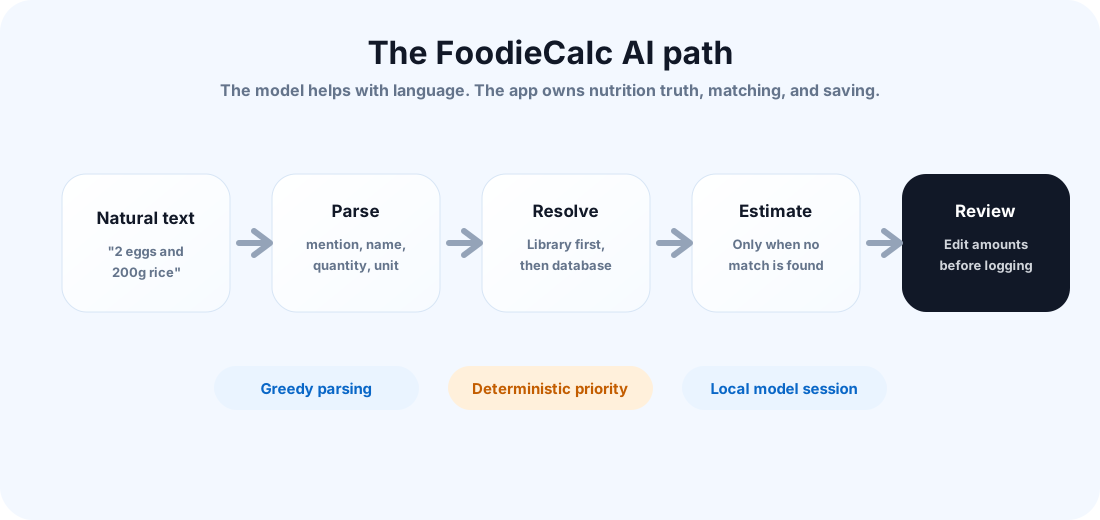
The resolver checks:
- local custom foods
- recipes
- saved meals
- the nutrition database
- an on-device AI estimate only if no match is found
That priority is important. Your own library should beat the web. A saved recipe should beat a generic guess. Real nutrition data should beat model estimation. AI estimation is useful as a fallback, but it should not override known data.
The code expresses that clearly in FCAIQuickLogResolver: library first, database next, on-device estimate last.
Review before save
This might be the most important user-experience decision in the whole feature.
AI Quick Log has two phases:
1. Analyze the description and present reviewable items.
2. Save only after the user confirms the reviewed items.
The first phase parses and resolves:
state.aiStep = .analyzing
parsed = try await foodParser.parse(text)
resolved.append(await resolver.resolve(item))
state.aiStep = .review
The second phase logs only the reviewed items:
state.aiStep = .logging
// save food, recipe, meal, or quick-log estimate
state.aiStep = .done(count: loggedCount)
This creates a much better relationship between the user and the model. The model can accelerate the flow, but the user keeps the final say.
They can edit amounts, change units, remove unwanted items, and decide whether an estimated item is good enough.
That is the FoodieCalc version of “trust, but review.”
AI insights on the dashboard
Foundation Models are not only used for logging.
FoodieCalc also has a daily nutrition insight service:
generateInsight(
    caloriesConsumed: Double,
    calorieTarget: Double,
    proteinConsumed: Double,
    proteinTarget: Double,
    carbsConsumed: Double,
    carbsTarget: Double,
    fatConsumed: Double,
    fatTarget: Double
) async throws -> FCAINutritionInsight
The model receives a compact summary of the day:
Today's nutrition: 1873/2200 cal,
158/160g protein,
106/220g carbs,
89/70g fat.
Provide one brief insight.
The output is typed:
@Generable(description: "A brief nutrition insight with emoji, title, and body")
public struct FCAINutritionInsight: Sendable {
    public var reasoning: String
    public var emoji: String
    public var title: String
    public var body: String
}
Again, this is not free-form text dumped into the UI. The app asks for a small, shaped result that fits the dashboard: emoji, title, body.
That keeps the final experience native and calm instead of feeling like a chatbot was bolted onto a nutrition app.
Estimation is useful, but clearly bounded
The third AI service is FCAINutritionEstimationService.
It estimates nutrition per 100g for a described food:
estimate(description: String) async throws -> FCAINutritionEstimateThis is useful for homemade dishes, quick entries, and foods that do not exist in the user’s library or nutrition database.
But the app treats it as an estimate. It is not the preferred path when better data exists. In AI Quick Log, estimation comes after local and database matching. In food creation, it can pre-fill fields so the user starts from a reasonable baseline and can still edit the final values.
That balance feels right for nutrition. AI should help the user move faster, but the interface should never pretend an estimate is the same as verified package or database data.
Session lifecycle became a performance feature
One of the most practical lessons was memory.
LanguageModelSession is powerful, but it should not be created casually and kept alive forever. FoodieCalc creates sessions lazily:
private func makeSessionIfNeeded() -> LanguageModelSession {
    if let session { return session }
    let session = LanguageModelSession(instructions: Self.instructions)
    self.session = session
    return session
}
Each service also exposes:
prewarm()
releaseSession()
resetSession()
That gave me a better mental model for AI inside an iOS app. It is not just an API call. It is a resource that affects memory, latency, and screen lifecycle.
For FoodieCalc, the dashboard insight service is lazy. The food parser can be prewarmed before the user needs it. Sessions can be released when the app no longer needs that model context.
This is the kind of detail that makes the feature feel native instead of heavy.
The final user experience
The user does not see most of this architecture.
They see a simple flow:
- Tap AI Quick Log.
- Type a natural sentence.
- Review the foods FoodieCalc found.
- Adjust anything that needs fixing.
- Log the meal.
That is exactly where I wanted the feature to land.
The AI is there, but it does not take over the product. It sits behind a fast native workflow and helps with the part computers are finally getting good at: turning messy human language into useful structure.
The rest is still FoodieCalc: SwiftUI, local data, CloudKit sync, FatSecret-powered nutrition lookup, custom foods, recipes, meals, widgets, and a UI designed around daily use.
What I learned
This feature made me think differently about AI in apps.
The strongest version was not “let the model do everything.”
The strongest version was:
- give the model a narrow job,
- ask for typed output,
- keep deterministic code in charge,
- check availability,
- manage session memory,
- keep the user in the loop,
- and make the UI feel like part of the app, not a demo pasted on top.
That is the Foundation Models lesson I am taking forward.
For an iOS engineer, this is exciting territory. We can now build intelligent features that still feel native, private, and product-shaped. FoodieCalc is my first serious step into that kind of app design.