FoodieCalc app icon

FoodieCalc for iPhone and iPad

Native. Private. Refreshingly complete.

Free foreverNo ads. No paywalls.
See it. Say it. Log it.

The free calorie & macro tracker for your whole picture.

Track calories, macros, micronutrients, hydration, and weight on iPhone and iPad. Snap a meal, ask Siri, scan a barcode, or log it your way—without a subscription, an ad, or a feature locked away.

Version 1.5.2Built for Apple devicesNo account required
FoodieCalc vitamins, minerals, and fiber progress screenFoodieCalc calorie, macro, hydration, and streak dashboardFoodieCalc barcode nutrition result with calories, macros, and serving details

$0 Complete app

Zero Ads or paywalls

Review first Responsible AI

New in FoodieCalc 1.5.0

See it. Say it. Log it.

Apple Intelligence, Siri, and an interface that adapts beautifully to every way you use iPhone and iPad.

Explore the full release

Smart photo logging

Turn a photo into an editable meal.

After you opt in, Apple’s Private Cloud Compute models analyze the plate. You review every item before it is saved.
Lunch Smart Mode
Greek yogurt180 g
Berries85 g
Review 3 items

Apple Intelligence markApple Intelligence

Siri & Shortcuts

Your quickest log starts with your voice.

Log food or water, and ask how many calories you have left—without finding the right screen first.

“Siri, log my lunch
in FoodieCalc.”

Ready to review

Visual Intelligence

Go from discovery to nutrition detail.

When iOS recognizes food, FoodieCalc can open as a destination with a ready-to-check match.
FoodieCalc app icon
Open in FoodieCalcApple · 1 medium

Adaptive by design

Portrait or landscape. Compact or wide. It fits.

Dashboard, Diary, Library, Progress, onboarding, and the new floating add menu reshape around your available space—not just the device name.
  • Two-pane diary and progress views
  • Card grids on iPad and iPhone landscape
  • A “+” menu that follows the tab bar
+

Loved on the App Store

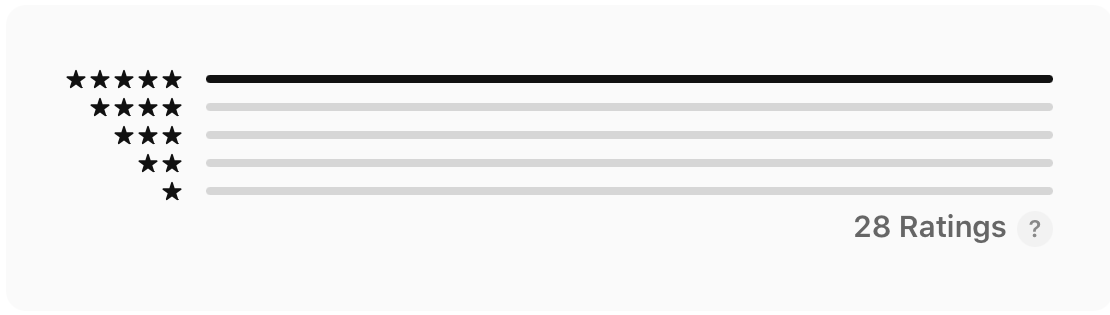
5.0

from 28 ratings

A perfect rating, earned one useful day at a time.

People are noticing the details that make FoodieCalc different: a clean interface, practical tracking, a broad food library, and thoughtful support—all without ads or a subscription.

See FoodieCalc on the App Store
App Store rating summary showing FoodieCalc rated 5.0 out of 5App Store rating distribution showing 28 ratings, all at five stars
App Store ratings · September 2026

Ready for iPhone Duo

Native by design.
Ready for every fold.

FoodieCalc uses native SwiftUI components and flexible layouts that respond to the space they actually have. Fold it, open it, or rotate it—the interface reorganizes instead of simply shrinking.

  • Native SwiftUI components
  • Open and folded layouts
  • Portrait and landscape
  • Safe-area-aware navigation

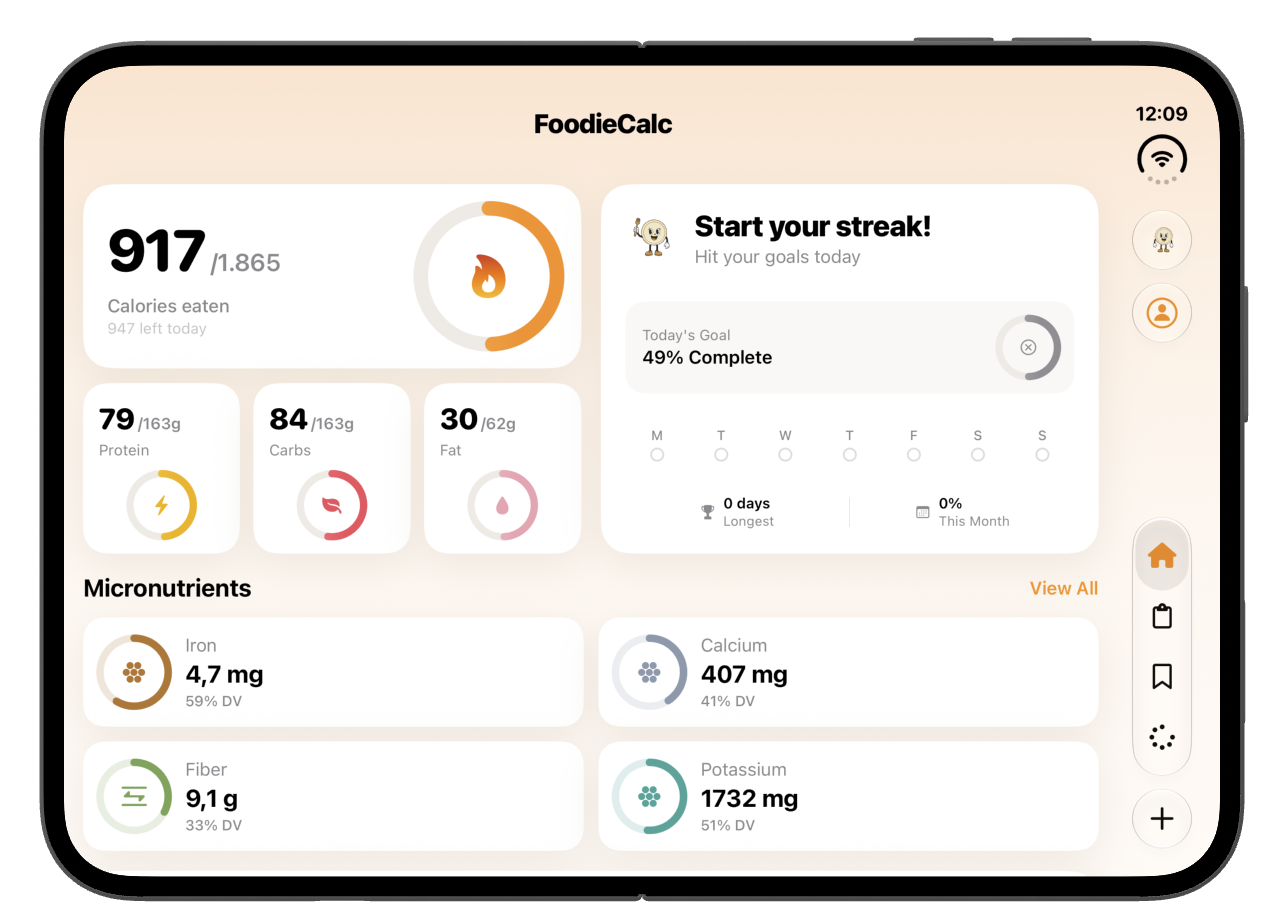
Open · Landscape

More room for the whole picture.

Dashboard cards expand into a balanced grid, keeping calories, macros, micronutrients, and progress visible together.

FoodieCalc dashboard adapted to the open iPhone Duo display in landscape

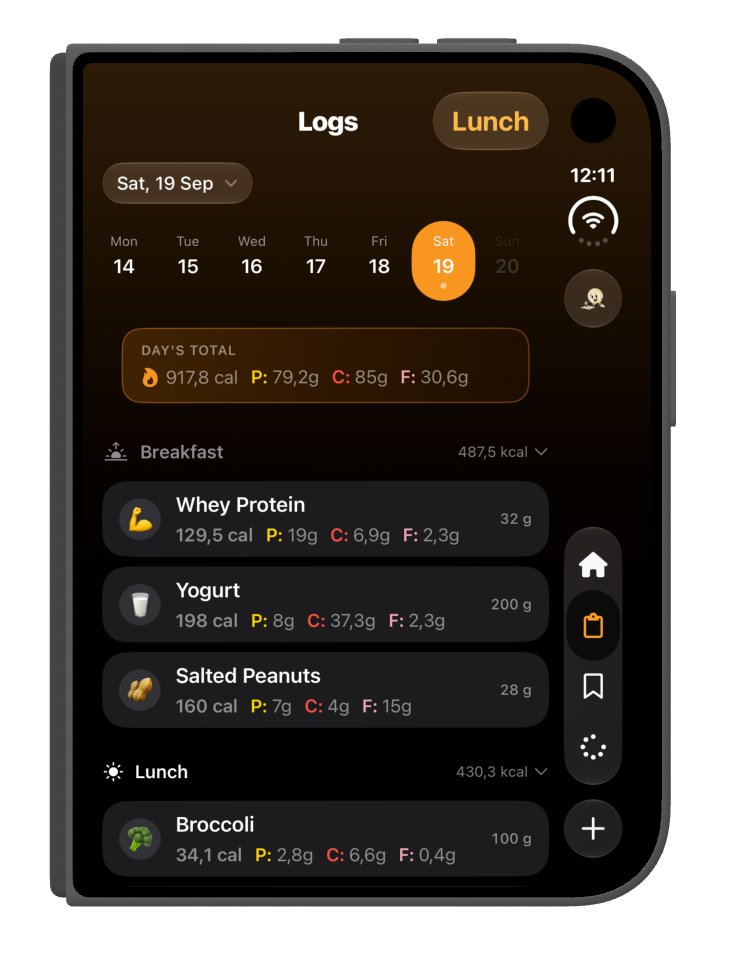
Folded · Portrait

The diary stays within reach.

The same native navigation settles beside a focused, one-handed log without hiding the day’s context.

FoodieCalc diary adapted to iPhone Duo in a folded portrait layout

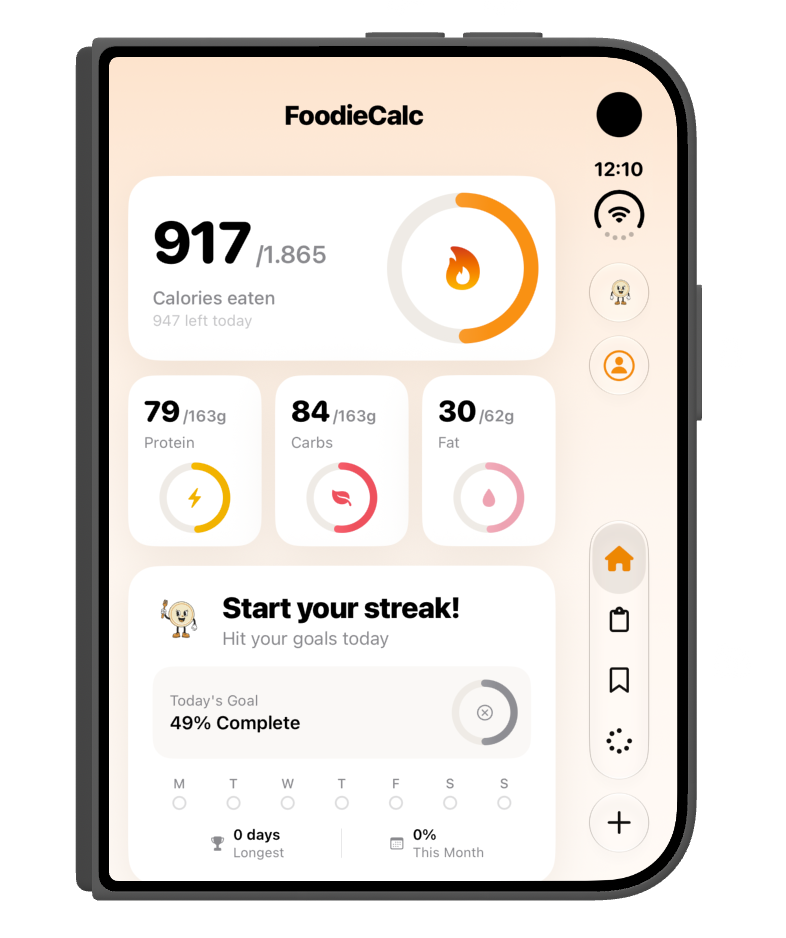
Folded · Portrait

Focused, not reduced.

The dashboard restacks around a narrower canvas while preserving comfortable controls and readable progress.

FoodieCalc dashboard adapted to iPhone Duo in a folded portrait layout

Open · Landscape

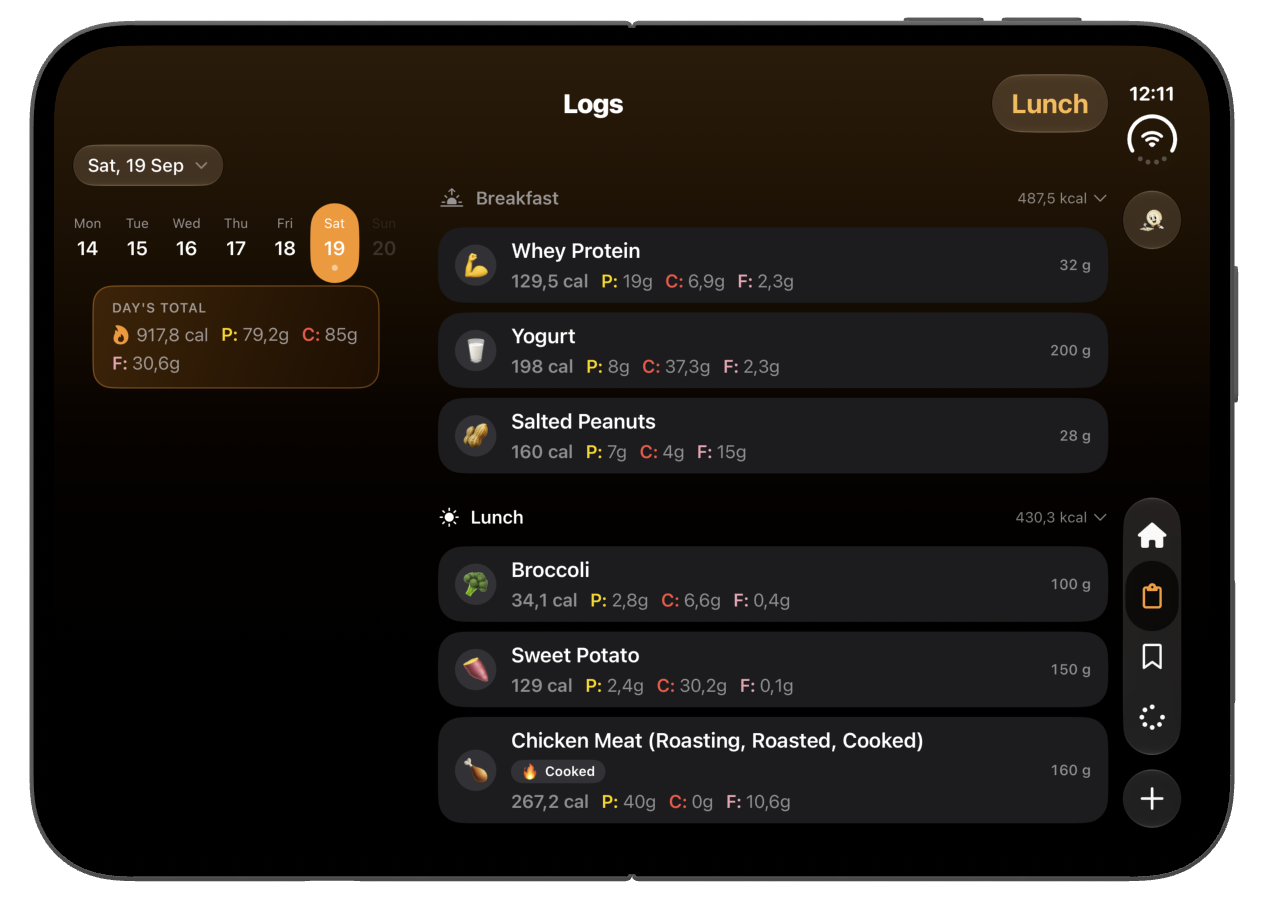
Logs become a two-pane workspace.

Dates and totals move to their own column, giving meals the wider canvas without changing how the diary works.

FoodieCalc diary adapted to the open iPhone Duo display in landscape

Built around Apple’s adaptive layout principles, so FoodieCalc follows the available space instead of making assumptions about the device.

Nutrition, not noise

Know what is working.
Understand what is missing.

FoodieCalc turns your daily log into a clear, honest view of energy, macros, hydration, vitamins, minerals, and consistency—without turning food into a judgment.

Goals that fit your week

One week does not need seven identical days.

Set calorie and macro goals for specific weekdays, then optionally let supported Apple Health activity adjust today’s target. Training days, rest days, and weekends can each have the plan that fits.

Thursday goal2,050
Activity credit+ 284
Today2,334 kcal

Nutrition Progress

Look beyond the big four.

Follow 19 vitamins, minerals, and extended nutrition values when data is available—with honest coverage indicators when it is not.

FoodieCalc Nutrition Progress overview for vitamins, minerals, and fiber

Hydration, in your own measures.

Create a custom water amount, log it from the app or Siri, and keep it in two-way sync with Apple Health. Progress stays visible across Dashboard, Diary, and Nutrition Progress.

1.95 of 2.5 L

Your dashboard, your way

Keep the signals you care about. Hide the rest.

Reorder and customize dashboard cards for calories, macros, hydration, micronutrients, weight, streaks, and insights.

FoodieCalc dashboard with calorie, macro, hydration, and streak progress

Fast in, useful out

Logging should take seconds, not become a second job.

Take a photo, ask Siri, talk, scan, search, or reuse your own foods, recipes, and meals. The new sectioned “+” menu keeps every route close and opens in the right place in portrait, landscape, and on iPad.

  • Photograph a meal, then edit the AI suggestions.
  • Say “two eggs and 150 grams of yogurt.”
  • Scan a barcode or use Visual Intelligence.
  • Choose meal and date during review, before saving.
FoodieCalc daily food diary with meal and nutrition totalsFoodieCalc photo and private on-device voice logging choices

Everything included

Powerful enough to grow with you. Simple enough to start today.

There is no “premium” column. Every feature below is part of the free app.

Actually free

No subscription, ads, locked features, or surprise upgrade screen. The complete tracker is free.

Smart photo logging

After you opt in, Private Cloud Compute can suggest foods and amounts from a meal photo. Review every item before saving.

Siri & voice logging

Describe a meal, log water, or ask what is left today. Voice audio is transcribed on your device.

Visual Intelligence

Open recognized food from the system experience directly in FoodieCalc for a ready-to-review match.

Made for every layout

Purpose-built stacks, grids, and two-pane views adapt across iPhone portrait, landscape, iPad, split windows, and iPhone Duo—open or folded.

Goals for every weekday

Set different calorie and macro targets for training days, rest days, weekends, or any day that needs its own plan.

Personal hydration

Create your own water amount, log with Siri, and keep water in two-way sync with Apple Health.

Activity-aware goals

Optional adaptive targets use supported Apple Health activity data to reflect how active your day really was.

Barcode scanner

Scan packaged foods for serving, macro, micronutrient, Nutri-Score, and NOVA details when available.

Nutrition Progress

Compare days and ranges across calories, macros, vitamins, minerals, fiber, sugar, and more.

Apple Health

Bring in activity and weight, and export supported nutrition data into your Apple Health picture.

Gentle Foodie Nudges

An optional, calm daily reminder helps when the diary is still empty. Never guilt-driven.

Sync your way

Use private iCloud sync on Apple devices, or optionally sign in with Apple or Google for account-based data sync.

The real app

Designed to feel at home on every screen.

Swipe through real FoodieCalc screens. Version 1.5.0 also reshapes key views for iPad and iPhone landscape.

Free means free

No ads.
No subscriptions.
No paywalls.

FoodieCalc is built by an independent developer who believes useful health tools should not hold your history, habits, or attention hostage. Optional tips support development, but never unlock features.

Unlimited food logging

Photo, Siri, voice, barcode, and search

Weekday calorie and macro goals

All progress and micronutrient views

Custom hydration, widgets, and sync

Private by design

Your health data is not an ad product.

FoodieCalc uses Apple frameworks, private iCloud storage, and on-device intelligence for typed and voice features. Meal-photo analysis uses Apple Private Cloud Compute only after disclosure and consent, and every result is yours to review before saving.

Read the privacy policy

Data with context

Broad food search, honest coverage.

Search combines your personal FoodieCalc library with supported FatSecret nutrition data and Open Food Facts barcode information. When a source does not provide a nutrient, FoodieCalc treats it as unknown—not zero.

Powered by FatSecret Platform API

Barcode and product data may also come from Open Food Facts.

Questions, answered

A free tracker without the fine print.

The short version: everything is included, your data stays yours, and the app is built for Apple devices.

Is FoodieCalc really free?

Yes. FoodieCalc is a free calorie and macro tracker with no subscription, no advertising, and no features hidden behind a paywall.

Does FoodieCalc show ads or sell my attention?

No. FoodieCalc has no ads and does not add tracking technology for advertising.

Can FoodieCalc track more than calories and macros?

Yes. FoodieCalc tracks calories, protein, carbohydrates, fat, hydration, weight, and 19 vitamins, minerals, and extended nutrition values when the food data includes them.

How can I log food?

Take a photo, ask Siri, describe a meal by voice, scan a barcode, search food databases, create foods and recipes, reuse saved meals, or quick-log nutrients. Photo and voice results stay editable until you confirm them.

How does AI photo logging protect my privacy?

Typed and voice AI features use Apple Foundation Models on your device. Meal-photo analysis uses Apple Private Cloud Compute only after a clear disclosure and your consent. Nothing is logged until you review it.

Do I need a FoodieCalc account?

No. All core tracking features work without one, and private iCloud sync can keep your data current across your Apple devices. An optional account uses Sign in with Apple or Google for cross-platform data sync, and signing in never uploads your existing diary until you explicitly approve it.

Does FoodieCalc work in landscape?

Yes. Version 1.5.0 adds adaptive grids, two-pane views, compact-height controls, and a floating add menu designed for iPhone landscape, iPad, and resizable windows as well as portrait.

Does FoodieCalc support iPhone Duo?

Yes. FoodieCalc uses native SwiftUI components and adaptive layouts that reorganize for iPhone Duo when it is open, folded, in portrait, or in landscape.

Which devices does FoodieCalc support?

FoodieCalc is a native app for iPhone and iPad. Apple Intelligence, Siri, Visual Intelligence, and some system-powered features depend on device, language, region, and OS availability.

FoodieCalc app icon

Available now · Version 1.5.2

See it. Say it. Log it. For free.

No trial countdown. No card required. Just a thoughtfully built calorie and macro tracker that adapts across iPhone and iPad.